


Audio quality is critical for content creators. Viewers will quickly leave a broadcast if they hear loud, repetitive clicking over your voice. Eliminating this background noise requires upgrading your hardware. This guide explains how to choose the right components for your desk, focusing on the mechanics behind quiet keystrokes.
You will learn how to optimize your streaming setup and select the exact gear needed to maintain professional, distraction-free audio during your live broadcasts.
Mechanical Keyboard Noise On Livestreams
The Issue With Condenser Microphones
Condenser microphones are highly sensitive. They are designed to capture the vocal nuances of a broadcaster. However, this high sensitivity means they also capture every physical impact on your desk. When you play fast-paced games, standard mechanical keyboard switches produce sharp, high-frequency sounds. These high frequencies travel easily through the air and bleed directly into your microphone feed.
The Limitations Of Software Noise Gates
Many broadcasters attempt to use digital noise gates via software to block out typing sounds. A noise gate mutes the microphone until your voice reaches a specific volume threshold. However, when you speak, the gate opens. The microphone then captures both your voice and the loud typing simultaneously. This makes the keyboard clatter highly noticeable during your commentary. Fixing the noise at the hardware level is the most effective solution.
The Impact On Viewer Experience
Professional audio sets top-tier creators apart from beginners. Viewers often listen to streams with headphones, making background noises much more prominent. Sharp clicking sounds directly in their ears cause auditory fatigue over long viewing sessions. Even standard red switches can produce a loud, disruptive sound when pressed forcefully during intense gaming moments. Fixing this requires adding specialized hardware to your streaming setup.
How Silent Mechanical Keyboard Switches Actually Work (Dampeners)
The noise from a keyboard comes from hard plastic hitting hard plastic. When you press a key, the plastic stem travels downward and hits the bottom housing. When you release it, the metal spring pushes the stem back up, hitting the top housing. Silent Mechanical Keyboard Switches solve this problem by adding small rubber or silicone pads to the internal sliding stem.
These internal dampeners act as physical shock absorbers inside the switch housing. When the stem reaches the bottom of the keystroke, the rubber pad absorbs the impact, eliminating the sharp clack sound. When the key returns to its resting position, a second pad cushions the upward impact against the top housing. This dual-dampening system drastically reduces the overall decibel level. If you are building a professional streaming setup, investing in switches with internal dampeners is mandatory for clean audio.
Top 3 Silent Linear Switches For Smooth Gameplay
Cherry MX Silent Red
For many years, standard red switches have been the default choice for gamers due to their smooth, bump-free travel. The Cherry MX Silent Red takes this exact linear design and adds patented noise-reduction pads. They require 45 grams of operating force, making them light and responsive for rapid inputs. You retain the fast actuation required for competitive gaming without the loud bottom-out sound.
Gateron Silent Ink Black
If you prefer a slightly heavier keypress to prevent accidental inputs, the Gateron Silent Ink Black is an excellent option. They require 60 grams of operating force. These silent linear switches are built with a proprietary plastic housing that further absorbs sound vibrations. They are highly regarded by custom keyboard builders for their smooth travel out of the box and very low sound profile.
Gazzew Boba Gum
The Gazzew Boba Gum models are premium silent linear switches known for their tight housing tolerances. This tight design prevents stem wobble, which stops the internal plastic components from rattling against each other during rapid typing. They provide a very soft bottom-out feel and are exceptionally quiet. They are ideal for content creators who tend to type or play games with heavy force.
Tactile Vs. Linear: Which Is Quieter?
Tactile switches feature a physical bump halfway down the keystroke. This bump provides physical feedback to your fingers, letting you know the key has successfully registered. While silent tactile switches do exist and utilize rubber dampeners, the physical friction required to overcome that tactile bump still generates a slight scratchy noise. The internal mechanics simply require more friction to operate.
Linear designs move straight up and down without any physical resistance or internal bumps. Because there is no internal friction mechanism to overcome, they are inherently quieter. When you are on a live broadcast, every minor sound reduction matters. For absolute maximum noise reduction, silent linear switches outperform their tactile counterparts. This smooth operation is why many streamers upgrade from basic red switches to specifically dampened linear models to keep their microphone feeds completely clear of desk noise.
Pair Your Keyboard With A Quiet Gaming Mouse For A Silent Setup
Upgrading your keyboard is only half the solution. In fast-paced games like shooters or MOBAs, players click their mouse hundreds of times per minute. Standard mouse switches use metal leaf springs that create a very sharp, high-pitched click. This frequency registers clearly above background game audio and vocal noise gates.
To complete your audio optimization, you must pair your dampened keyboard with a quiet gaming mouse. These specific mice utilize optical switches or specialized dampened mechanical microswitches to mute the clicking sound. For example, when you are aiming down sights or rapidly firing during a tense match, a quiet gaming mouse registers the inputs with a low, dull thud rather than a sharp snap. Using both dampened Mechanical Keyboard Switches and a quiet gaming mouse ensures your hands remain completely silent on the microphone.
Conclusion: Build a Silent Streaming Setup That Lets Your Voice Shine
Professional stream audio requires eliminating background noise at the source. Replacing standard keyboards with dampened, linear alternatives immediately prevents sharp plastic impacts from reaching your microphone. By combining these upgraded switches with proper desk mats and a silenced mouse, you create a quiet, distraction-free environment. This hardware investment allows your viewers to focus entirely on your commentary and gameplay, significantly improving the overall production value of your live broadcasts.
FAQs
Do silent switches affect gaming performance?
No. Dampened silent switches register inputs at the exact same speed as standard switches. The internal rubber pads only absorb the sound of the physical impact; they do not introduce any electronic delay, input lag, or actuation changes during gameplay.
Can I put silent switches in any keyboard?
You can only swap switches easily if your keyboard has a hot-swappable printed circuit board (PCB). If your keyboard is not hot-swappable, the current switches are soldered to the board. You will need to desolder the old switches and solder the new ones in place.
Are rubber o-rings as effective as silent switches?
No. Rubber o-rings are installed outside the switch, under the keycap. They only dampen the downward keystroke (bottoming out). They do not silence the upward return of the key (topping out). Dedicated silent models have internal dampeners for both directions, making them much quieter.
How do I stop my microphone from picking up desk vibrations?
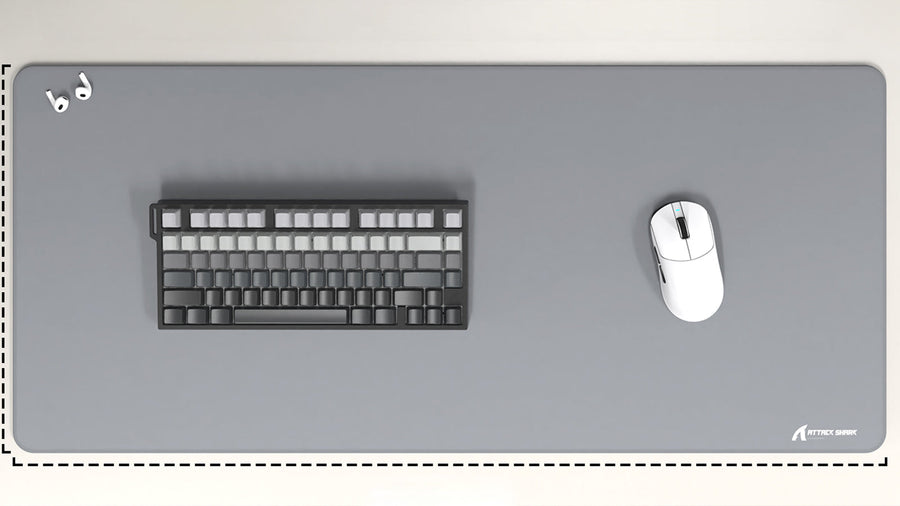
In addition to quiet switches, use a thick rubber desk mat beneath your keyboard to absorb vibrations. You must also mount your microphone on a suspension boom arm with a shock mount. This physically isolates the microphone from the hard surface of your desk.